
Color By
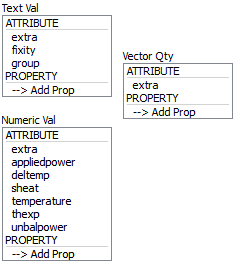
Determines how the plot item will be colored.
There are three groups of options here: textual values, numeric values, and vector quantities. All choices are mutually exclusive; only one selection can be active at any time. With some choices an additional field is supplied; when they appear these are described in the tables below. Any vector quantity will supply an additional field to specify whether a component (x, y, or z) or the magnitude (mag) of the vector should be rendered.
Selecting “–>Add Prop” at the bottom of a selector will provide a dialog that allows the user to specify a new property to add to the list (and make it the active color by selection).
Selecting the labels ATTRIBUTES and PROPERTIES on a selector will do nothing; these are provided to assist with group differentiation.
Once the quantity/value/property to be colored is chosen in Color By, the user can handle the specifics of the coloring using the Color Opt attribute.
| Name | Description |
|---|---|
| extra | Colors by extra variable. An additional field is supplied to identify the variable by its index. |
| fixity | Colors by fixity. |
| group | Colors by group. An additional field is supplied to specify the slot index. The default setting is Any (which occupies index position 0 on the spinbox). |
| Name | Description |
|---|---|
| extra | Colors by extra variable. An additional field is supplied to identify the variable by its index. |
| appliedpower | |
| deltemp | |
| sheat | |
| temperature | |
| thexp | |
| unbalpower |
| Name | Description |
|---|---|
| extra | Colors by extra variable. An additional field is supplied to identify the variable by its index. |
And now for some more text.
| Was this helpful? ... | PFC © 2021, Itasca | Updated: Feb 25, 2024 |